



General contractors across the US, whether you're running a small crew or a large company, are dealing with a mix of challenges and opportunities in 2026. But safety? That's the one persistent challenge that affects US contractors, regardless of their size. And it hits in more ways than just physical risk, as there are big financial and legal stakes too. That's why more construction businesses are ditching outdated processes and turning to software to improve visibility, productivity and safety across their jobsites.
In this article, we cover why construction safety software is worth the investment, how to evaluate different tools, and the best options available to US contractors in 2026.
Why Invest in Construction Safety Software?
For those still trying to manage safety documentation on paper… issues are inevitable. Critical records get lost, misplaced, or buried in binders. Forms don't get signed. Orientations don't get recorded.
Plus, safety-related challenges continue to rise. OSHA is raising expectations, making managing safety documentation more complex. And the industry remains one of the most dangerous professions in the U.S., as OSHA notes that 20% of fatal workplace injuries occur on construction sites (based on the Bureau of Labor Statistics).
If a safety incident occurs and you’re still managing documentation on paper, you’ll likely scramble to find the proof your insurer or lawyer needs to confirm your subcontractors completed their SSSPs, SDS, orientations, permits, JHAs and pre-task plans. If you can’t produce the documentation, you’re up the creek facing the potential of significant fines.
Digitizing your safety documentation removes the potential liability for your project and business. The right construction safety software creates a searchable, legally defensible audit trail. However, it can do more than help you reduce risk.
Construction safety software can automatically enforce compliance, enhance the safety culture, improve back-end productivity, and give your safety managers and project teams real-time visibility across all active job sites.
Selecting the ideal construction safety software is a process. To get the most out of a tool, you need to select the one that best suits your type of works and region of operation.
Does a tool built for office-based reporting suit your needs? What about one designed for specialty subcontractors managing their own teams? Then, there are enterprise platforms that require a dedicated administrator to configure and maintain.
Don’t know what to look for when considering investing in construction safety software?
Check out this 2026 construction safety software buyer’s guide to explore your options and learn how to choose the right solution for any US contracting firm, no matter your budget or company size.
What Should You Look for When Buying Construction Safety Software?

When buying any new software, there are lots of bells and whistles. But do you need them? Will they benefit your company? Maybe.
Consider this: It’s a lot easier to find what you’re looking for if you know what you’re looking for.
So, before you evaluate specific tools, establish the essentials you need from a platform. Buyers who understand their needs look beyond feature lists and evaluate tools on outcomes.
Here are the key things you should consider as you review construction safety software.
Foreman-Led Workflow
As a GC, you rely on the foreman. They’re the backbone of site safety and communication as they own the risk for their crew.
OSHA also recognizes this, as they are considered the ‘competent person.’ This person is the “one who is capable of identifying existing and predictable hazards in the surroundings or working conditions which are unsanitary, hazardous, or dangerous to employees, and who has authorization to take prompt corrective measures to eliminate them.”
Of course, each subcontractor on the jobsite has their own foreman. Most teams hold a foreman meeting, where foremen report verbally on crew size and the day's scope of work. It's a live accountability check.
The best construction software builds on this existing behavior.
So, look for a platform with a workflow designed specifically for subcontractor foremen, allowing them to check in their own crew and submit documentation on behalf of their workers. This keeps crews accounted for without adding burden to individual workers and gives GC superintendents and safety officers real-time visibility into who is on site and what is being completed each day.
The result: no more liability exposure and significant gaps in labor hour data for GCs and subcontractors.
Field Usability
The best tools are useless if they aren’t being used by those in the field.
McKinsey notes construction tech boomed in the early 2020s. In fact, the industry has been incorporating tech tools for years and continues to do so. Yet the Becker Friedman Institute for Economics (BFI) at the University of Chicago says, “… the value added per worker in the construction sector was about 40 percent lower in 2020 than in 1970.”
There’s not one single reason for this paradox.
However, one definite element is that the technology is not being well integrated into the workflow. It could even harm the process. A safety tool that field workers won't use is worse than no tool at all, because it creates a false sense of compliance.
The best construction safety software is designed from the worker's perspective — simple, mobile-first, and requiring minimal training. It enables easy sign-in, provides multilingual support, and offers fast onboarding.
This type of field-native tool reduces administrative friction and increases productivity.
GC-to-Subcontractor Communication
As a safety manager or operations lead for a general contractor, you’re responsible for the safety of everyone on the jobsite, even subcontractors that your company doesn't directly employ. You need to maintain safety documentation and be able to easily share it with subs.
Getting the entire team on the same page is challenging. It’s more so when subs are coming on and off the job throughout the project. Communicating with the team is an issue that needs to be addressed daily. This eats into back-end productivity, since you’re spending time each day chasing paperwork and ensuring it's completed.
Construction safety software should minimize these challenges and simplify communication. It should store information so that it’s easily accessible. This makes it easier to ensure every crew stays compliant and is on the same page.
So, as you consider construction safety software options, ask yourself questions, including:
- Does the software support the flow of requirements from GC to sub?
- Can a foreman manage their crew's compliance through a single interface?
- Or does it treat every company as an isolated silo?
With these features, you can be confident about GC-to-Subcontractor Communication and have the information you need to remove liability from your business.
Back-End Productivity (Not Just Front-End Convenience)
The best construction safety software benefits the back end as much as if not more than the front end. In fact, the real ROI safety software is typically on the back end.
Think about how much time your team is spending on essential yet menial tasks such as scanning paper documents, manually filing incident reports, chasing signatures, and assembling compliance records when an audit or insurance review arrives.
What if you had that time back? Your staff could focus on other responsibilities, allowing more work to get done and boosting overall productivity.
The team could also easily gather the necessary documentation for an audit or insurance review, instead of scrambling to find it. So, no more sweating to ensure you have sufficient documentation that proves your firm is not liable.
Therefore, as you evaluate the available tools, consider what they eliminate from your team's day, not just what they digitize. Reclaim your time.
US Compliance & Liability Focus
US contractors need to be on top of safety requirements for multiple reasons, including ensuring OSHA compliance. OSHA has very specific regulatory requirements for construction job sites.
The penalties for non-compliance are severe. In 2024, a Serious Other-Than-Serious Posting Requirements or failure to abate incurs a penalty of over 16,000 dollars per violation. A willful or repeated violation will cost offenders over $165,000 per violation.
And violations are common.
As you strive to find safety software for your general contracting firm, treat compliance as a feature, not a footnote. After all, the regulations are a legal landmine. A failure to comply with OSHA requirements can turn a successful project into a failure in terms of the bottom line, besides making the workplace less safe.
The construction safety software should have conditional access tied to credential status, automated orientation records, and searchable audit trails linked to individual worker identities. These features will keep you OSHA compliant and your jobsite legally defensible.
Integration With Your Existing Stack
Got a problem you want to solve? There’s a construction technology tool out there that can help your general contracting firm with the issue.
“The average contractor runs 11 discrete applications yet just one-third exchange data without manual workarounds,” according to a report from Mordor Intelligence. What does that mean? The tech stack isn’t connected.
Having construction technology tools is great, but when they don’t speak to each other, the benefits are limited. In fact, it can lead to even greater admin burdens as you try to manage all your independent systems.
If you’re part of a mid-to-large-sized general contractor, you probably already run Procore, Autodesk, or a similar construction management platform. The best safety tools are designed to complement that investment, not replace it.
So, as you shop for software to help with safety, look for deep, reliable integrations that auto-populate daily logs, sync documentation, and don't require custom development to maintain.
When you connect your tech stack, you maximize the ROI of each tool.
Implementation Complexity
As an operations lead or corporate safety manager, safety is your top priority. Safety should matter to everyone in the organization, given its impact on company liability. As noted above, a safety mishap has multiple negative consequences.
Despite the emphasis on safety, your US Contracting firm probably has a limited budget dedicated to it. Most firms view it as a cost center and therefore want to limit spending on safety.
While investing in construction safety software saves money and increases productivity, it also involves costs. The costs are dependent, to some degree, on the complexity of the software.
Some enterprise safety platforms require a dedicated resource whose sole purpose is to serve as a full-time administrator of the tool. That person’s role is to configure and maintain the software and to enforce its use.
If this is the case, that would mean a significant increase in overhead for your team. On the other hand, some construction safety software is a simple plug-and-play, so it doesn’t require a dedicated team member to oversee it. Another benefit of this type of software is that it’s usually simpler to operate, leading to quicker adoption and faster time to value.
The 6 Best Construction Safety Platforms for US Contractors in 2026
1. Breadcrumb
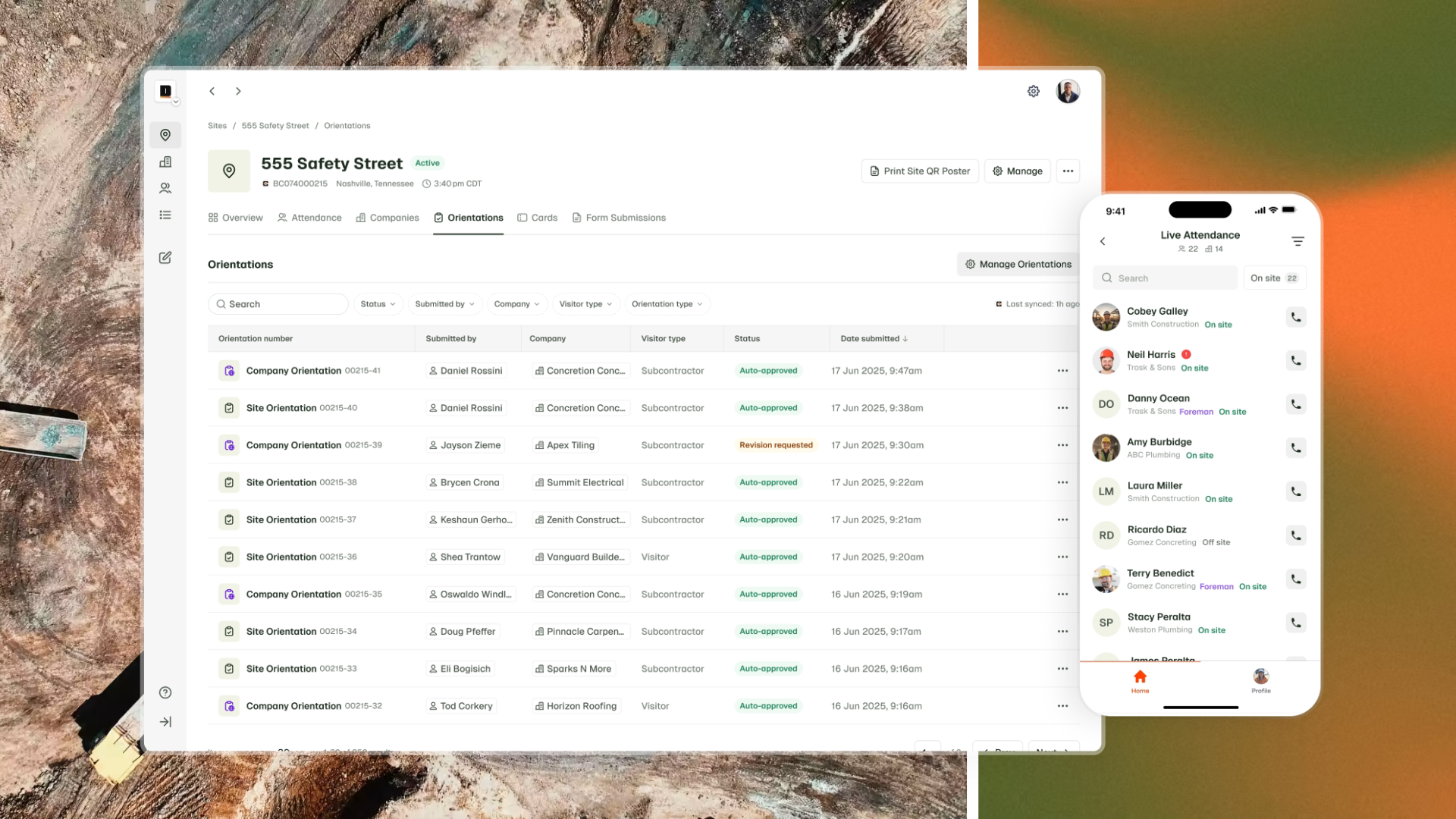
Breadcrumb is a modern jobsite safety, compliance and productivity tool built for the construction industry in the United States and operating globally.
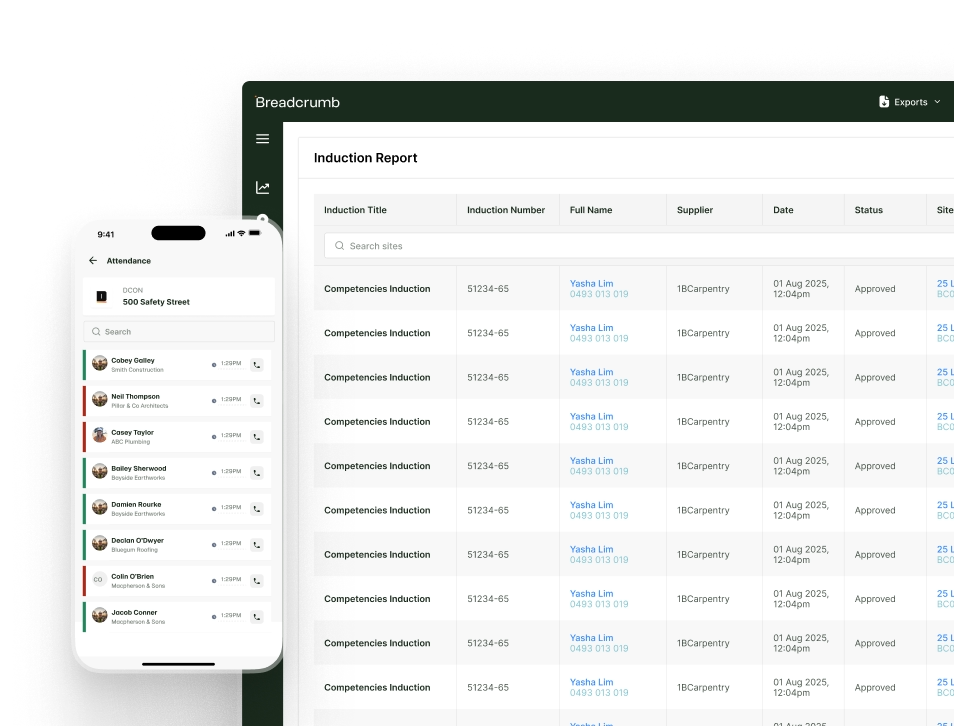
Available on mobile and desktop, Breadcrumb houses vital jobsite safety documentation such as orientations, training and certifications, JHAs, and man-power counts, as well as a complete worker directory linked to every site with the ability to send messages directly to each worker on site. The centralized hub is accessible to everyone who needs it and integrates with Procore in real-time.
By streamlining a typically disjointed experience and creating a direct path of communication to the worker, Breadcrumb helps jobsite teams manage projects more efficiently, without losing sight of safety.
Features and benefits:
- Foremen-led workflow: Empower your subcontractor foremen to manage orientations, sign-ins, permits, pre-task plans, and JHAs for their crew, all in one place.
- Automated compliance checks: Instantly verify if workers have completed required orientations and safety training.
- Centralized record-keeping: All digital SSSPs, SDS, JHAs, PTPs, permits, and field forms are stored in a single location.
- Real-time workforce oversight: The tool enables you to see who is compliant and who’s at risk, so you can take action before issues arise.
- Simple UX: A modern interface that even the most tech-averse teams find easy to navigate.
- Regulatory-ready reporting: Easy-to-generate audit reports for OSHA or internal compliance checks.
- Two-way integration with Procore: The Daily Log is automatically filled with accurate manpower hours, and the Project Documents Tool is populated with all orientations, certifications, pre-task plans and JHA’s completed in Breadcrumb.
Why choose Breadcrumb?
Breadcrumb’s field first tool revolves around the subcontractor's foreman to ensure your site is covered from every angle during the lifecycle of the project.
- Before work begins, subcontractors submit their company documents, including SSSPs and SDS, directly through Breadcrumb.
- On Day 1, foremen check in their crew, complete orientations, and capture signatures on site from their mobile device.
- Throughout the project, they can manage crew sign ins, submit daily pre-task plans, JHAs, and permits in minutes.
Superintendents get real-time visibility across every crew and subcontractor on the jobsite. General Contractors get a complete, searchable record that builds itself, from the first document submitted before breaking ground to the last check out of the project. The documentation serves as proof in the event of an OSHA audit or an insurer request.
Ideal For
General contractors in the $15M to $2B revenue range running commercial projects in the US who want a plug-in-play digital safety tool that integrates with Procore.
2. HammerTech
HammerTech is a cloud-based collaborative platform that enables users to consolidate safety, quality and daily field management processes into one holistic solution.
Key Features
- Online inductions and registration
- HSEQ inspections
- Plant management
- Subcontractor management
- Permits to work
- Injury and incident management
- Analytics and reporting dashboards
Ideal For
Large enterprise general contractors who are replacing their existing safety program and who have a dedicated safety technology resource to manage the platform.
3. SiteDocs
SiteDocs is a digital safety management software used to support worksite compliance.
Key features
- Custom form builder
- PDF document library - JHAs, safety plans, inspection checklists
- Worker certification management
- Mobile access for field teams
- Offline-mode
- Reporting
Ideal For
Specialty contractors, subcontractors, and self-performing teams managing their own internal safety documentation.
4. MyComply
Mycomply is a technology company that provides construction compliance and workforce management solutions.
Key Features
- Hardware-based site access control and badging
- `Digital orientations
- Time and Attendance tracking
- Digital forms
- Manpower monitoring and reporting
Ideal for
General contractors, subs, asset owners, and government that require hardware-based access control and compliance credential management.
5. Nyfty.ai
Nyfty.ai makes AI assistants that automate construction sites using SMS, QR Codes and Digital Passes.
Key Features
- SMS/text-based interface
- Project safety plan
- Safety docs, including JHAs, site permits and pre-task plans
- Toolbox talks
- Manpower logs
- Safety orientations and worker certifications
- Inspections
- Site attendance
Ideal For
Smaller general contractors or entry-level buyers looking for a low-cost, minimal-setup solution to reduce paper-based safety admin.
6. Procore (Quality & Safety Module)
Procore is one of the most popular construction management platforms in the United States, and its Quality & Safety module adds safety observation, inspection, and incident reporting capabilities to the broader Procore environment.
For field-level pre-task planning, worker journey management, and subcontractor compliance, a digital safety tool like Breadcrumb integrates with Procore to fill that gap.
Key Features
- Site diary
- Safety observations and inspections (Project level)
- Incident reporting and management
- Forms and templates
- Document management
- Reports
- Action plans
Ideal For
General Contractors already running Procore who want safety reporting and management-level visibility within their existing environment. For field-level pre-task planning, worker journey management, and subcontractor compliance, a dedicated tool like Breadcrumb integrates with Procore to fill that gap.
How to Choose the Right Construction Safety Software for Your Team

Still need help determining the best construction safety software in 2026?
The biggest question to ask before you make your purchasing decision about construction safety software is: What challenges do you want the software to help you overcome?
By keeping this practical thought in mind, you can avoid getting caught up in the various bells and whistles each software promises.
Consider the scenarios below to help guide you through the decision process.
You're a mid-market to enterprise GC ($200M–$2B revenue) managing commercial projects with multiple subs:
You need
A platform built for the GC-to-sub workflow, not just internal documentation.
Look for
A foreman-led workflow engine, a conditional worker journey, a field-friendly interface, centralized documentation, and Procore integration.
Best fit
Breadcrumb. The tool is geared towards general contractors of this size, is built for the GC-to-sub workflow, features a foreman-led workflow, and integrates with Procore.
You're a large enterprise GC ($2B+) looking to replace your entire safety program for incidents and inspections:
You need
A comprehensive platform you can configure to your standards. You have the resources to manage it.
Look for
An end-to-end safety ecosystem, strong observation and incident management, and deep reporting.
Best fit
HammerTech (be prepared to dedicate a resource for usage). The software is geared toward large enterprise general contractors and is ideal for those looking to replace their entire system and can commit a resource to manage the platform.
You're a specialty contractor or trade sub managing your own team's compliance:
You need
A simple way to digitize your internal forms and track your crew's documentation.
Look for
a low-friction, easy form completion, and basic reporting.
Best fit
SiteDocs. The program is ideal for specialty contractors who want a simple, easy-to-use tool for basic reporting.
You're already running Procore and want to add safety capability:
You need
To determine whether you need management-level reporting (Procore's own safety module) or field-level execution (Breadcrumb).
Look for
Tools that complement each other and feed off each other, so information is easily accessible and not siloed.
Best fit
Breadcrumb + Procore. The two are complementary — Procore handles top-down visibility, and Breadcrumb handles the worker and foreman layer. A second option is the Procore safety module alone, which can be used for reporting-only needs.
.png)
Our Recommendation
If you’re a mid-market to enterprise US general contractor, you probably have teams running commercial projects with multiple subcontractors. You’re very likely using Procore, as it’s the leading construction management software company in the US, with 25% of all US General Contractors using it as of 2022. Finally, you’re most likely accountable for OSHA compliance and insurance documentation across the entire worksite.
Sound familiar?
If so, Breadrumb is the ideal construction safety software for your construction company in 2026
It's the only tool of the six best construction safety platforms built specifically around the foreman-led, worker-journey workflow that defines how safety actually operates on a commercial jobsite.
The software plugs into Procore without replacing it, so everything is in one place. No more missing or siloed documentation.
Breadcrumb is simple to run as it requires neither hardware nor a dedicated administrator to oversee it. So, your safety managers spend their time on safety, not finagling software. This benefits everyone - from the crew to the safety manager.
Frequently Asked Questions
What is the best construction safety software for the US in 2026?
For mid-market to enterprise general contractors running commercial projects in the US, Breadcrumb is the strongest option in 2026. The software combines a foreman-led workflow engine, deep Procore integration, and a field-native design that drives adoption across crews and subcontractors.
What's the difference between construction safety software and a safety forms tool?
A safety forms tool (like SiteDocs) digitizes your paper forms and gives you a place to store and retrieve them. A safety workflow platform (like Breadcrumb) enforces prerequisites. A worker can't sign in without completing orientation, and can't access a pre-task plan without meeting the credentialing requirements for that job site. This workflow approach creates a stronger compliance trail and is more defensible in the event of an incident or insurance review.
Does Breadcrumb replace Procore?
No. Breadcrumb is designed to work alongside Procore, not replace it. Procore handles project management, documentation, and top-down reporting. Breadcrumb handles field-level safety, including orientations, pre-task planning, workforce tracking, and subcontractor compliance. The completed documents automatically sync into Procore's Daily Log and Documents.
What should a corporate safety manager or risk director prioritize when evaluating safety software?
US-based risk managers consistently prioritize three things: compliance documentation that is searchable and linked to individual worker identities; a system that enforces prerequisites rather than just recording what was submitted; and an audit trail that's defensible in front of an insurer or in a legal proceeding. Ultimately, it’s about reducing risk. Yet, it’s the back-end productivity gains due to eliminating paper scanning, manual filing, and chasing signatures where the ROI is most evident.
Is all construction safety software suitable for small contractors?
No. It depends on the tool. Some tools, such as Nifty.ai and SiteDocs, are designed for smaller teams with simpler needs. Breadcrumb is built for mid-market and enterprise general contractors. For very small specialty contractors, even a basic digital forms tool will deliver significant value over paper-based processes.
About Breadcrumb
Breadcrumb is a modern jobsite safety and compliance tool built for the construction industry in the United States and operating globally across the United Kingdom, Ireland, Australia, and New Zealand.
With a focus on digitizing vital safety documentation and increasing visibility of worker sign-in and attendance, we empower jobsite teams to manage projects safely and efficiently. Available on mobile and desktop, Breadcrumb integrates with Procore in real-time — keeping all your core project information in one place.
It’s the ideal construction safety software solution for US Contractors.
Want to learn more about how Breadcrumb can help your mid-market or enterprise general contracting firm? Book a demo and learn how Breadcrumb can help you reduce risk, remove liability from your business, and improve back-end productivity.
built for the field.
